
Construction daily report software: How to save 20+ hours per week
Daily reporting on infrastructure projects costs more time than most contractors realize. Here's where those hours go — and how to get them back.
Request a demo
Where reporting hours actually go, what a missing or late record really costs, why the standard approach hits a wall at scale, and what infrastructure teams that have solved this problem have actually done differently.
You've absorbed the cost of bad reporting before — everyone running infrastructure has. The project manager who spent Monday morning chasing four foremen for Friday's logs. The quality deviation that nobody flagged until the layer above it was already down. The warranty dispute where the contractor couldn't produce a dated record of what was built or when.
Daily reporting is supposed to prevent all of this. On a small project it often does. On a 30-kilometer highway with a dozen subcontractors and three years of construction ahead, the same approach that worked on a contained building site quietly becomes a second job — one that absorbs 20 or more hours a week and produces documentation that's often incomplete, late, or impossible to search when you actually need it.
The question isn't whether daily reporting matters. It's where the time goes, and how much of it you can recover. Most of it traces back to the way information moves — or doesn't — between the field and the office, which is the core problem behind most construction field reporting breakdowns. And most of it is fixable.
Where the 20 hours actually go
The number sounds large until you start counting.
The first block is chasing and reformatting. With multiple subcontractors on site, daily reporting doesn't happen once — it happens five or six times in parallel, in five or six different formats, submitted at five or six different times, or not at all. Someone in the office has to pull it together into something coherent before the weekly client update. That job falls to whoever is closest to the data, and it happens every single week.
The second block is retrieval. Daily reports are only useful if you can find them later. When they live in email threads, personal inboxes, shared drives with no consistent naming convention, and sometimes WhatsApp messages with attached PDFs, finding something specific — what was the crew count on the drainage section on March 14th? — turns into a half-hour search. On a project that runs three years, that search gets harder every month.
The third block is duplication. Field supervisors log something on paper, then re-enter it into a spreadsheet, which gets copied into a client report. The same information passes through three different formats before it reaches anyone who needs it. Every transition is an opportunity for an error, and every transition takes time.
None of this time is spent on construction. It's spent managing the system around construction. And unlike rework, which at least shows up as a visible cost, reporting overhead just disappears into the hours of people who have better things to do with them.
Twenty hours a week sounds manageable in isolation. But on a 3-year infrastructure project, it compounds.



Here's what that overhead actually costs, based on a project manager and quality engineer each absorbing a share of the weekly reporting burden:
Over €150,000 in direct labour on a single project — before a single dispute, before a single warranty investigation, before a single rework event that could have been caught two days earlier.
That's the number that never appears on the cost report but shows up in the margin every time.
| Cost item | Amount (EUR) |
|---|---|
| Project manager — fully loaded cost per hour | €55 |
| Quality engineer — fully loaded cost per hour | €45 |
| Combined reporting overhead per week (chasing, compiling, reformatting, searching) | 20 hrs/week |
| Split: 12 hrs PM + 8 hrs QE per week | — |
| Weekly cost: (12 × €55) + (8 × €45) | €1,020/week |
| Over a 3-year project (150 working weeks) | €153,000 |
| Disputes without documentation, warranty investigations, rework from delayed decisions | not counted |
| Total direct overhead cost | €153,000+ |
What a missing or late daily report really costs
The direct cost — the administrative hours — is only part of the picture.
Daily reports are a project's contemporaneous record. They document what was built, who was on site, what materials arrived, what the weather was, what issues came up. When that record is incomplete or filed two weeks after the fact from memory, problems that surface later become harder and more expensive to resolve. Consider a delay dispute. The subcontractor claims bad weather held up drainage work for four days in October.
The project owner disputes it. If daily reports from that period are missing, or were filled in retrospectively, the contractor has no credible documentation to stand behind. A proper daily reporting system would have logged weather conditions automatically, tied to GPS coordinates and date stamps, with the foreman's on-site notes attached. Without it, you're arguing from recollection against someone else's recollection.
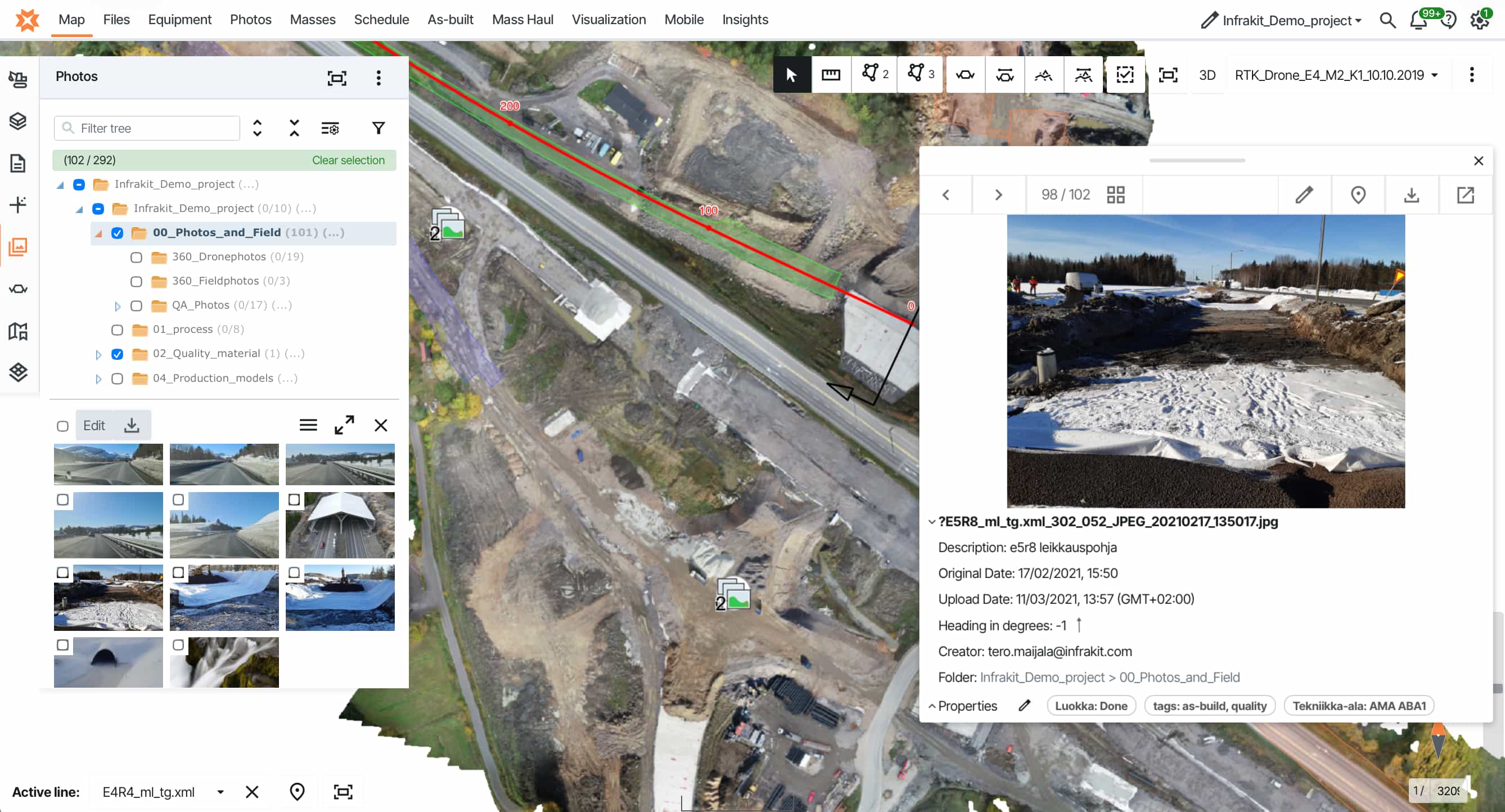
The same logic applies to warranty claims. Infrastructure projects carry obligations that run for years after handover. When a defect appears in year three, the question is always the same: was this an installation problem, or did it develop later? On one Estonian road project, the answer depended entirely on whether the right photos existed. Kadi Tuum, Project Manager at the Estonian Transport Administration, explains what they did during construction to protect against exactly that situation:
"We had problems with the quality of the lower asphalt surface. I asked the site engineer to register all the places with a picture, where the lower asphalt pavement had defects. After a few years... it's easy for me to inspect the site and disassemble the situation that was at this particular location."
Kadi Tuum Project Manager · Estonian Transport AdministrationStop losing 20 hours a week to daily reporting
Every subcontractor's daily report in one place, captured in the field on a mobile app that works offline and tied to GPS location and timestamp automatically — so nothing needs reformatting, chasing, or searching for months later.
There's also what late reporting does to decision-making during construction. Without a dated photo record, an investigation like Kadi Tuum's would require excavation or guesswork — with one, the answer is a filter and a few seconds.
The same principle applies in real time: when the project manager only sees what happened on site 48 hours after it happened, they're always reacting to the past.
A problem visible on Monday — a crew working in the wrong area, a material delivery that didn't arrive, a quality deviation that should have been flagged — surfaces on Wednesday when the window to fix it cheaply has already closed.
Why the standard reporting approach hits a wall
Most site teams develop a reporting system that works — at a certain scale.
Three machines, two foremen, one project manager, a manageable site. The foreman fills in the daily log on paper or in a spreadsheet. The PM picks up the phone if something looks off. It holds together because the volume of information is small enough for a few people to manage between them.
Scale that up to a complex urban infrastructure contract with multiple subcontractors, phased work stages, and a project owner who wants verified weekly progress — and the same approach doesn't just struggle. It breaks. Not because the people are less capable, but because the system was never designed for that level of complexity. Tieluiska Oy, a Finnish contractor specializing in urban infrastructure, described their pre-digital situation directly.
Plan changes didn’t reach the field in real time. Machine control models were updated with a delay after plan revisions, and data moved on USB flash drives, which slowed work and raised the risk of crews using outdated material. The site picture was pieced together from Excel spreadsheets, site diaries, WhatsApp messages, emails and word of mouth.
Their Technical Manager Esa Hytönen put it plainly:
"Status information about the project came largely by phone or text, which made it challenging to form an overall picture."
Esa Hytönen Technical Manager · Tieluiska OyThis isn't unusual. It's the default state on most infrastructure sites that haven't actively addressed the problem. The failures compound in specific ways: inconsistency grows with headcount, version control disappears, and location becomes invisible.
A daily entry that says "drainage work completed" tells you almost nothing on a multi-kilometer urban project without GPS coordinates and a map to anchor it to.
The core issue is that the standard approach treats reporting as a documentation task to be completed after the work is done. On complex infrastructure, it needs to be a real-time record of what's happening, where, and who's responsible for it. Those are not the same thing.
What good daily reporting looks like on a large infrastructure project
The shift isn't about more paperwork. It's about capturing the right information once, in the right place, at the right moment — and making it findable years later without anyone having to search for it.
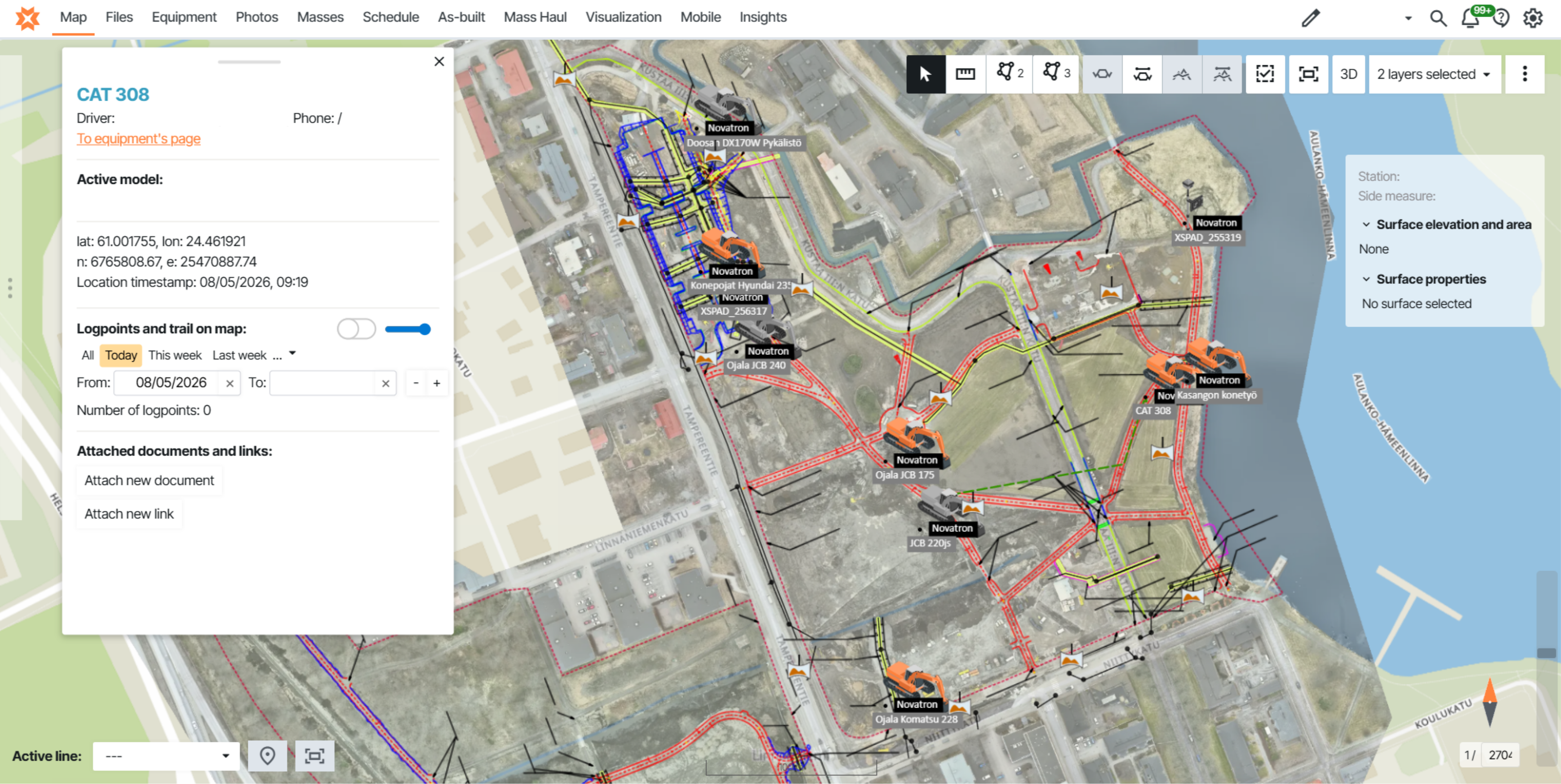
For infrastructure, everything needs to be tied to location. Not just a project name or a date, but a specific chainage or GPS coordinate. A photo of drainage installation at kilometer 14.7, tagged with the date and the name of the engineer who took it, is useful for five years. A photo labeled "drainage work Thursday" is useful for about a week.
Standardized templates matter more than most teams realize. When the office configures report forms — daily progress, safety log, quality check, material delivery — and field teams fill them out on a tablet, several things happen at once. The right questions get answered consistently across every subcontractor, the information reaches the office in a format that needs no re-processing, and the foreman spends four minutes on it rather than twenty minutes from memory at the end of the day.
Connectivity is a real constraint on infrastructure sites — tunnels, remote sections, dense urban areas with patchy signal. The difference between capturing something as it happens and writing it up from memory an hour later is the difference between an accurate record and a best guess.
The four pillars that make it work:
- >Location — chainage or GPS coordinates on every entry, not just a project name and date
- >Standardized templates — the same questions, answered the same way, by every subcontractor
- >Offline-capable capture — reporting happens in the field as work progresses, not from memory that evening
- >Real-time visibility — the project manager sees yesterday's work today, not two days later
Results from teams that made the switch
The teams that have improved their reporting the most haven't done anything exotic.
They standardized what reaches the office, made verification real-time, and stopped asking the project management team to compile information that should have been organized automatically.
The benefit shows up in two places: fewer hours spent on administration, and a project record that holds up when it actually matters.
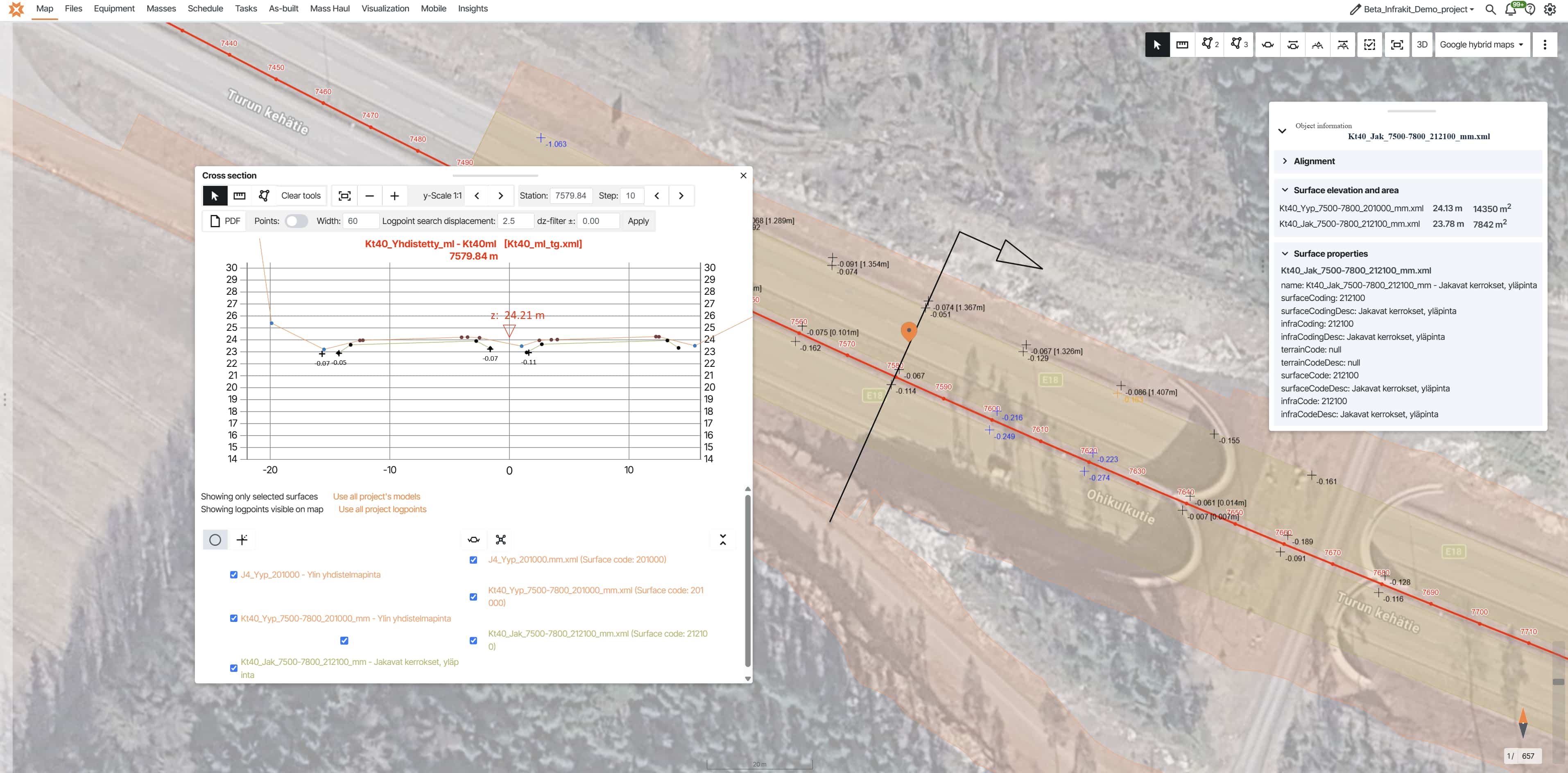
Plans, field data, progress tracking, and photo documentation all available in one place. Payment approvals use saved views showing completion status, inspection data, and as-built measurements overlaid on orthophotos — making the approval process transparent and verifiable rather than a manual cross-referencing exercise.
Working across infrastructure projects in the Netherlands, the saving was specific enough to put a number on.
"Working this way saves one man, in my estimation, 20 hours of work per week."
Jan Boerman Surveyor · Dunnewind Groep (Netherlands)The pattern across these projects is consistent. Time savings show up in two distinct places — one at the management level, one in the archive.
The first is less time spent compiling and chasing information for weekly updates. The second is less time spent searching for specific records when something needs to be verified or disputed.
That second benefit — the Kadi Tuum scenario, where a GPS-tagged photo from three years ago resolves a warranty question in seconds — often matters more, because that's when the stakes are highest.
How to make it stick across your whole operation
The technology is the easy part. Getting consistent adoption across a mixed crew — foremen, subcontractors, site engineers, surveyors — is where most rollouts succeed or quietly fail.
The teams that get adoption right start narrow. Pick two or three template types: daily progress, safety log, quality check. Get those working consistently before adding more. Tieluiska's experience reflects what works in practice: adoption typically progresses step by step, often starting with photo documentation and expanding to other functions. Basic usage becomes natural within a few weeks, and smooth daily use is established within one to two months.
Find the on-site champions early. There's usually one foreman per subcontractor who picks up new tools quickly and is willing to show others. These people are worth more than any training session. When the tool is genuinely useful for the people using it — when a foreman can pull up yesterday's photos on site without asking anyone — adoption takes care of itself.
The office setup matters as much as the field setup. If the project manager still needs to export data, reformat reports, and manually compile weekly summaries, the system hasn't solved the problem — it's just moved it. Weekly client updates should take minutes, not hours.
A few things consistently don't work: desktop tools that require walking back to the site trailer before anything can be submitted, forms with too many required fields, and apps that need connectivity to function. Remove those friction points and adoption follows.
The underlying principle is simple: make it easier to report correctly than to skip it. When field teams use a mobile app that works offline, takes four minutes to complete, and lets them access their own photos instantly, they stop working around the system. When the office sees reports arrive in real time without chasing anyone, the weekly summary becomes a by-product of the workflow rather than a separate job.
For the complete picture of how leading infrastructure teams manage documentation, quality control, and project handover — including lessons from the Tampere Tram, Norway's E6, and Austria's A9 — see the guide: 10 Steps to Deliver Infrastructure Projects On Time & On Budget →
Daily reporting is costing your project more than it should
[VERIFY: If the management team is spending significant time each week chasing reports, reformatting data, or searching for records that should be findable in seconds — that's the workflow Infrakit is built to fix.] Book a call with our team and we'll show you what a different setup looks like on a project like yours.
Frequently asked questions | What is a construction daily report? Who fills out daily reports on an infrastructure project? How much time do site teams actually spend on daily reporting? What should a construction daily report include? How does digital daily reporting connect to quality documentation and handover? What happens when a subcontractor doesn't submit their daily report? Does construction daily report software work without internet connectivity? |