
Frequently asked
questions
Everything you need to know about Infrakit — from platform basics to specific product modules.
Request a demo General / Platform
How much can I actually save by using Infrakit?
Based on real customer projects, savings of 10–20% of total project costs are achievable. The Tampere Tram was delivered ~€37.5 million under budget, the E6 Arnkvern–Moelv motorway in Norway came in 15–20% under budget and opened eight months early, and the Pääskyvuorenrinne project in Turku finished €1.1 million under budget. The primary driver is eliminating rework, reducing miscommunication, and ensuring everyone always works from the same up-to-date models.
Which file formats does Infrakit support?
Infrakit supports all common infrastructure formats including XML and LandXML for 3D design models, IFC, DWG, DXF, PDF, LAZ/LAS for point clouds, GeoTIFF for orthophotos, and more. Even if your current design files are in a vendor-specific format, they can almost always be converted from native to open formats by exporting from design software, ensuring you can get to work without delay.
How quickly can we get up and running?
Infrakit can be operational within a few hours. Onboarding typically takes one to two days, and the Customer Success team provides training and setup support tailored to your project's workflows.
Is our data secure?
Yes. Infrakit complies with ISO 27001 information security standards.
We've tried other platforms and they were too complex for site crews. Is Infrakit actually easy to use in the field?
This comes up constantly in customer feedback. The threshold for use is intentionally low — it's cloud-based, and works on any smartphone, tablet, or PC. At the E18 Vestkorridoren project in Norway, the BIM coordinator described the biggest challenge as "demystifying the technology" — and found that willingness to try it was the real barrier, not the platform itself. The Infrakit Field app is designed so that machine operators, foremen, and non-technical site staff can use it independently from day one.
Do I need to replace my machine control systems to use Infrakit?
No. Infrakit connects your existing fleet, even mixed fleets, into a single overview. When you upload a 3D model to Infrakit, it automatically converts to each manufacturer's format and pushes to their portal via API — Trimble WorksManager/WorksOS, Topcon Sitelink 2, Leica ConX, and Novatron Xsite. For example, on the E6 Arnkvern–Moelv project, Veidekke ran Leica, Novatron, Makin3D, Digpilot, Trimble, and Topcon systems simultaneously through Infrakit instead of managing six separate portals.
Infrakit Office
How does Infrakit Office help keep a project within budget?
All stakeholders get real-time access to the same models, as-built data, and documentation in a single map-based dashboard — fewer wrong decisions, fewer re-dos. Customers report up to 20% reduction in total project costs.
Can multiple contractors and subcontractors work in the same environment?
Yes. Rights management lets you control what each party can view or edit, while everyone shares one source of truth.
How does version control work when designs change mid-project?
New versions are uploaded by drag-and-drop with automatic revision tracking. Everyone always sees the latest; previous versions are archived but accessible.
Can I manage drone imagery and orthophotos inside Infrakit?
Yes. Upload and visualize orthophotos and point clouds directly on the project map. Volume calculations from digital elevation models are also supported.
How does equipment tracking work?
Real-time machine locations, active model versions, calibration status, and activity history — all visible on the map without needing to visit the site.
Infrakit Field
What can site crews actually do with the Field app on their phone or tablet?
They can view the latest design models and drawings, see their GPS position in relation to the design, take georeferenced photos that automatically appear on the project map at the correct location, view saved views prepared by the office, and access as-built data. At the Tampere Tram project, supervisors used it to plan traffic arrangements several steps ahead by overlaying aerial photos with surveyed infrastructure positions.
Does the Field app work without a professional surveyor present?
Yes, and reducing dependence on surveyors for routine checks is one of the most frequently cited benefits. At the Paris Metro Line 11 extension, the site foreman used Infrakit with a GNSS antenna to perform acceptance surveys himself as work progressed — at 2 cm accuracy — without waiting for a surveyor.
What if there's no internet connection on site?
The Field app supports offline use, with data syncing when connectivity is restored.
Infrakit Survey
Do I need a professional surveyor to use Infrakit Survey?
No. It's designed so anyone, including foremen, machine operators, and site engineers, can easily capture accurate field data using an RTK GNSS antenna.
How accurate are the measurements?
With an RTK GNSS antenna, centimeter-level accuracy is achievable — validated by independent owner measurements on real projects.
How does Survey data connect to the rest of the project?
It flows automatically into Infrakit Office, appearing on the map alongside design models, photos, and machine data. Quality managers can monitor deviations in real time.
Does Infrakit Survey replace our existing survey equipment?
No. It works with GNSS equipment from major manufacturers and adds a cloud layer that makes your data instantly visible and shared.
Can the project owner see survey results in real time?
Yes. As-built measurements appear on the shared map as they're captured — no waiting for compiled reports.
Infrakit Truck
How does Infrakit Truck improve mass haul management?
Infrakit Truck gives real-time visibility of truck locations, load types, and haul routes, with geofencing to ensure statistics are accurate. At the E6 Moelvkrysset project, the survey manager described this as seeing "in real time how much and which fraction has been run" — replacing manual logging with automatic, reliable records.
Is the app difficult for drivers to use?
The driver workflow is intentionally simple — load, haul, unload — with automatic geofence detection reducing required interaction. The design goal is that drivers use it without it becoming a burden.
Can I track multiple material fractions separately?
Yes. Different material types and fractions can be tracked and reported separately, giving accurate mass balance data across the project.
Can I use Truck data for billing and progress reporting?
Yes. Accurate, automatic haul records replace manual logs and provide verified quantities for invoicing and progress tracking.
Infrakit Insights
We run many projects simultaneously. Can Infrakit give us a portfolio-level view?
Yes, and this is the primary purpose of Infrakit Insights. It aggregates data across all active projects — progress, quality metrics, machine activity, CO₂ statistics — into a single organizational view. This enables comparisons between projects, identification of underperforming areas, and data-driven decisions at a leadership level rather than project level.
Can Infrakit help us track and reduce our carbon footprint?
Yes. Infrakit Insights provides CO₂ statistics both at the organizational level and down to individual machines. This supports sustainability reporting, EU Green Deal alignment, and emissions reduction targets. As Infrakit's CEO Teemu Kivimäki has put it, what can be measured can be optimized — and eventually eliminated.
What is "digital maturity analytics"?
It shows how actively your teams are using the platform across roles and projects, helping identify where people need additional support or training to get full value from model-based construction.
How does Insights differ from Infrakit Office?
Infrakit Office is project-level — managing models, data, and documentation for a single project. Insights is organization-level — comparing performance, progress, and sustainability across your entire portfolio.
Can I compare performance between projects?
Yes. Insights enables side-by-side comparisons of progress, quality, and efficiency metrics to identify best practices and underperforming areas.
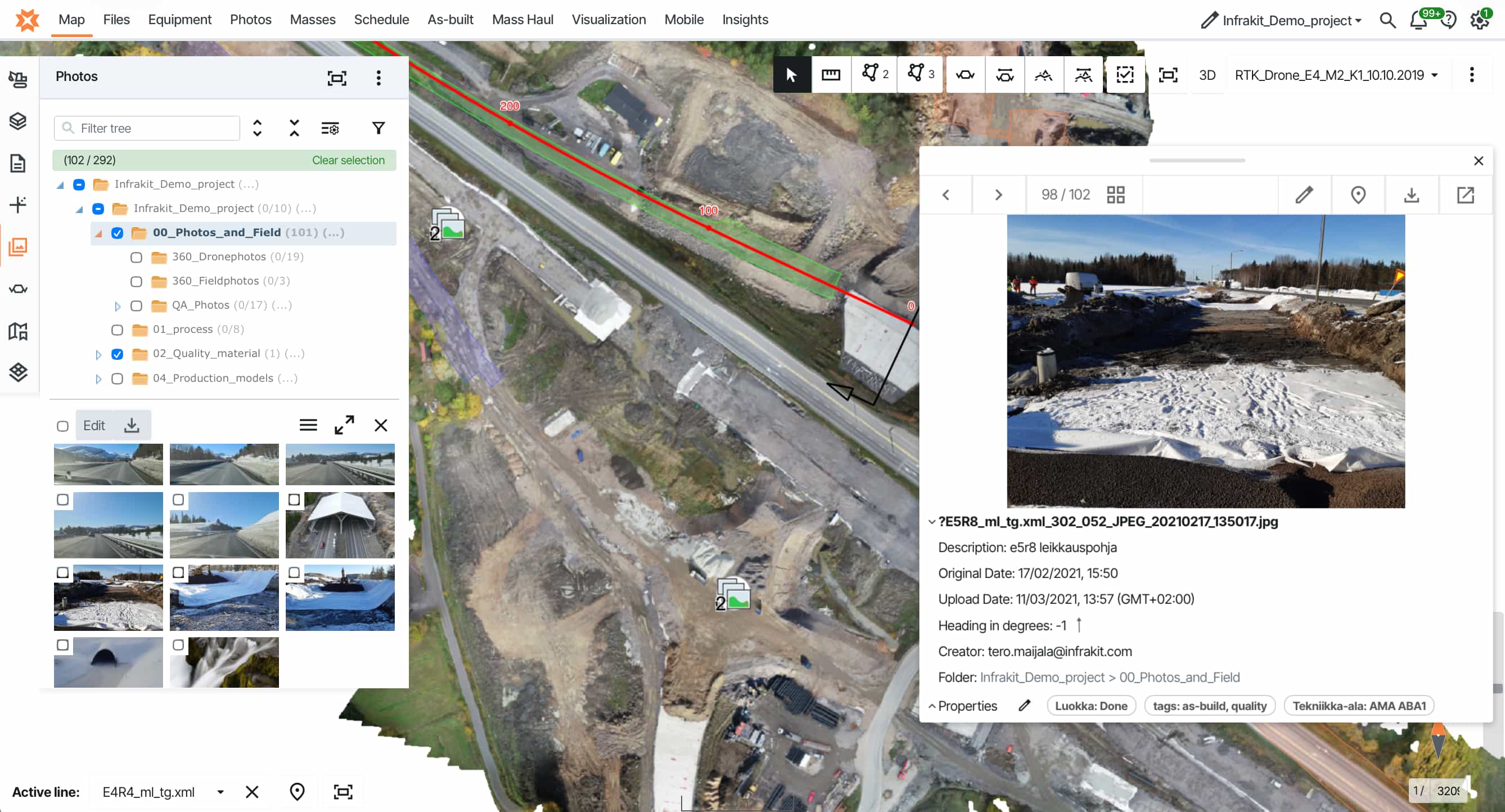
>1,750,000 photos and drone maps used for documentation and real-time collaboration
+5% reduction in carbon footprint
achievable with Infrakit's support
achievable with Infrakit's support
>6000 projects executed with enhanced workflows by Infrakit
>700,000 2D drawings and 3D models used for measuring, progress and quality control
Let's see how we can help you
Unlock the power of real-time data integration and drive efficiency, transparency, and sustainability in every project.