
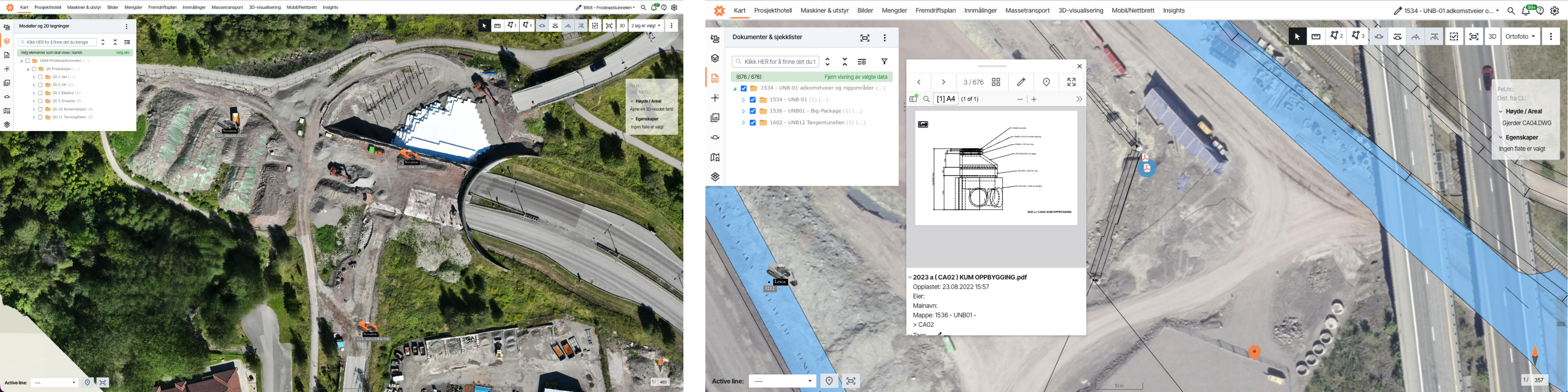
We were fortunate to have a conversation with Ole Jonny Ovenstad at Marthinsen & Duvholt. Ole Jonny has been working with Infrakit for several years and is currently site manager at the Frodeås Tunnel in Tønsberg. He shares how he uses Infrakit and his thoughts on the platform.
Thank you for your time! When did you start using Infrakit, and why?
Ole Jonny: I first started using it in 2019/early 2020, on the UNB01 project — a railway project running from Barkåker up to Nykirke. That was my first introduction to Infrakit, which was new and exciting at the time. We were a bit skeptical — “what’s the point of this?” — since we were perfectly comfortable working with PDF drawings. I’m from the old school, and for some reason we tend to trust paper most.
That’s understandable — there’s a certain comfort in sticking with what you know?
Ole Jonny: Exactly. In a way, we got gradually drawn into the digital world. It was actually our surveying foreman who suggested it, and we agreed to give it a try. We had a few sessions with the Infrakit team, who walked us through the practical value of the platform, and we quickly realized it could make a real difference — especially on projects covering significant distances, like UNB01, which spans 12 kilometres.
What was the biggest difference you noticed when you adopted Infrakit? Was there a learning curve, or did you see value quickly?
Ole Jonny: Compared to walking the line with PDF drawings, pointing and sketching to explain what needs to be done — this was a night-and-day difference. There was no question about it. Particularly on a project of that scale, with so many operations and so many people involved. At peak, we had 21 excavators running, which I was largely managing on my own with just a couple of guys out in the field. We managed to significantly reduce the management overhead and the number of supervisory staff needed.
Another major advantage is that whatever the machine operators see on their screens — in terms of machine guidance — I can see on my screen as well. So if someone says “I don’t have that file,” I know they’re simply looking in the wrong place. That real-time visibility is clearly a key strength of Infrakit, and as far as I know it still is. Several competitors are trying to offer something similar, but I find they fall short on these practical details. Our surveyors are very happy that we use Infrakit and consider it an excellent tool.
How do you use Infrakit on a day-to-day basis?
Ole Jonny: It’s one of the tools I use most throughout the day — many hours of use, first thing on and last thing off.
In day-to-day operations, we run frequent drone surveys to keep our base map up to date, and then I layer all the relevant data on top of that. This allows me to use measurement tools and set-out functions, and — most importantly — it means I don’t have to be out in the field nearly as often. When the crew comes in with questions, we can go straight into Infrakit and see exactly what we’re doing and why. It’s invaluable. The downside? I’ve gotten lazier — I don’t need to go out in the field as much anymore.
Ha! You’re joking about the downsides, but are there any real challenges with the software?
Ole Jonny: If I’m really pushed to find something negative, I’d say I’ve missed having a more robust 3D function. Everything has room for improvement. Perhaps better integration for 3D visualisation with Trimble?
The Frodeås Tunnel is well known locally for its challenging ground conditions. Do you think Infrakit offers particular added value on a project with those kinds of specific challenges?
Ole Jonny: The way we use it at the Frodeås Tunnel, it’s primarily for mapping and production management. Infrakit gives us good control over the placement of fill material, steel core piles, and EPS (expanded polystyrene) build-up. You could certainly add map layers or models for specific ground conditions, but we haven’t needed to on this project — it’s fairly compact and we have a good overview of the site.
On a larger project, the advantage would be even greater. On UNB01, for example, we registered archaeological heritage sites in Infrakit, so when the operators were working out in the field, their screens would show a red alert warning them to keep well clear of those areas. We also used it to mark different stockpile zones to distinguish between topsoil and contaminated materials.
Is there anything else you’d like to add, or any thoughts on something we haven’t covered?
Ole Jonny: Ha, I’ve got plenty of thoughts! Another major benefit is that we can attach documentation to manholes — manhole cards and construction drawings — so that when I tap on a manhole in Infrakit, I can pull up the PDF showing the manhole build-up, and I can also attach site photos. And of course, using the mobile app you can walk the alignment in the field and see exactly where the manhole should be positioned and where the existing utility network runs.
On UNB01 especially, which was such a large area with a lot of woodland and varied terrain, it wasn’t always obvious where to begin. Being able to stand out on the alignment and actually see where things need to go and how best to sequence the work — that’s where I’ve really come to love this platform. It all comes back to production — and that’s what’s won me over completely.