
🚧 Deliver infrastructure projects on time & on budget — learn how in our new guide.
Best construction management software: types, use cases, and how to choose the right platform
Introduction
Before we dive into a construction management software comparison, it helps to clarify what “construction management software” actually means, what types exist, and what each type is best at. In practice, the “best” platform depends on your project type (infrastructure vs. buildings), your project phase (design vs. execution), and how well your site teams can keep one shared source of truth—especially when surveys, drones, machines, and multiple contractors are involved.
This guide explains the main software categories, when you need which type, and which solutions tend to fit different real-world use cases—so you can choose without getting trapped in generic feature checklists.
Table of Contents
What is construction management software?
Construction management software is any digital system used to plan, coordinate, execute, and document construction work—from tender and design through execution, handover, and claims.
The nuance: “construction management software” is an umbrella term. It can mean anything from a BIM viewer to a document control system, a site diary / defect tool, or a map-based execution platform that links designs, survey, drones, machines, and geo-referenced site evidence into one shared workflow.
In practice, “construction management” software can include very different products, such as:
- Map-based execution platforms for infrastructure work (live map as the primary interface)
- BIM-centric platforms (model viewing, issue management, design coordination)
- Project management tools (tasks, schedules, RFIs)
- Document management systems (folders, approvals, versioning)
- Field reporting & QA tools (daily logs, checklists, punch lists)
- Cost & ERP systems (cost control, invoicing, procurement)
- Reality capture platforms (drone/point cloud visualization)
That’s why “best construction management software” is always a question of: best for what job?
The main types of construction management software
Most tools have a “center of gravity,” even if they offer adjacent features. Here is a short overview of the types and what’s their core idea.
Map-based infrastructure management platforms
Core idea: A live map is the primary interface. Teams use it to coordinate plan layers, progress, it also includes field documentation, and reality capture—so office and site stay aligned.
BIM-centric platforms (model viewing + field quality/issues)
Core idea: The BIM model is the main collaboration object (viewer-first), often combined with issue/quality workflows.
Field documentation + defects + inspections (plan-based “pinning”)
Core idea: Capture and track defects, inspections, site diaries, and tasks. Tickets and observations are typically pinned to drawings/plans, and sometimes BIM models. This functionality is also often a part of map-based platforms.
End-to-end construction suites (PM + quality/safety + financials)
Core idea: One platform spanning multiple domains (project management, quality/safety, field workflows, reporting, and often financial management).
Legal/compliance template software
Core idea: Standardized letters, templates, and compliance guidance for contractual processes.
Field collaboration / drawing access tools
Core idea: Reliable access to plans and field items (issues, photos, forms) for site teams, often optimized for mobile use.
What “good software” depends on (beyond features)
Construction software wins or loses in execution. Two platforms can look similar in a demo, but behave very differently in real jobsite conditions. That’s why it is important to look at some of the core vitals on such a platform that spans beyond its features. Examples could include:
- Workflow fit: Infrastructure management or execution workflows vs. building BIM coordination are fundamentally different. It very much depends on your needs. Sometimes you might need both.
- One shared source of truth: Preventing outdated plans and version mismatches is a major value driver and the value of it spans from the early days of a project to years beyond its completion.
- Field usability: Mobile capture and role-fit user experience matter daily, especially for foremen and subcontractors. Can your team be onboarded quickly? Does it make their life easier?
- Integration reality: If you rely on drones/orthophotos, survey updates, and machine control, value depends on how those flows are integrated between each other, not just “can we upload files?”.
- Adoption + customer success: ROI often comes from rollout quality, training, and how well processes are standardized across stakeholders. Therefore it is crucial to choose a tool with a great track record of customer support and onboarding plans.
Quick comparison: best tools by typical job-to-be-done
This is our “best fit” guide, not a ranking. It can be used to shortlist 2–3 options for a custom pilot.
Swipe left to see full table →
| Solution | Best for | Typical strengths | Typical limitations |
|---|---|---|---|
| Infrakit | Infrastructure & civil construction execution | Map-first workflows; location-based “site truth”; real-time coordination across stakeholders; strong alignment with survey, machine control, and reality capture workflows; field documentation included | Not designed as a “BIM-only” building coordination platform |
| PlanRadar | Field management, inspections, site diaries, evidence collection, plan view | Tickets pinned to plans; mobile capture of photos/notes; reporting and handover documentation workflows | Not positioned as a machine-control-focused infrastructure execution system |
| Capmo | SME construction site management and documentation (DACH), folder interface | Mainly documentation, tasks, construction diary, defect processing, acceptance workflows; mobile + web for site coordination | Not positioned as BIM-first or machine-control-first |
| Dalux | BIM viewing + quality/issue workflows | BIM viewer-focused collaboration; issue and quality tracking aligned with BIM and site execution | Less emphasis on execution as a map-first, machine-control-centric workflow |
| Procore | Enterprise-wide construction management (including financial workflows) | Broad suite across project execution, quality/safety, reporting, and financial management | Rollout effort and platform complexity can be higher than “single-purpose” tools; document-centric and less “visual” |
| Autodesk Build | RFIs, submittals, meetings, issues, forms and document workflows | Strong structured workflows for office-to-site processes; fits teams standardized on Autodesk environments | Can be less flexible if you’re looking for a map-first infrastructure execution approach |
| PlanGrid | Field access to plans + field items | Reliable access to drawings and field items like issues/photos/forms; mobile collaboration | Not positioned for infrastructure execution control and map-first coordination |
Map-based execution vs. BIM-centric platforms (when each wins)
This is a decision that is likely to be amongst the most crucial ones you will make, as it will define what your source of truth will be like in everyday life.
Most teams begin to compare tools based on lists of features (issues, tasks, checklists, drawings, models) but the bigger question is: how do you think your project needs to be coordinated?
In infrastructure management, the nature of implementation is frequently location-based: employees must perceive what is taking place where, contrast planned and actual through long site corridors, and maintain survey updates, drone/photo documentation and field records harmonized in real-time.
The map-first vs. BIM-first choice is not about which tool is more sophisticated, it is about which interface most accurately captures your decision-making process, and which errors are the most costly.
Choose map-based execution when:
- Your work is infrastructure-heavy (roads, rail, utilities, earthworks) — Infrastructure work is location-driven across large areas, so a map interface reduces ambiguity and speeds up coordination.
- You run model-based construction with mixed machine fleets and want one visual control layer — A map-first platform helps unify data from different machine control technologies, visualize machine productivity and QA status, and manage execution from a single, shared live view.
- Your coordination is location-driven: what happened where, what changed today, what’s current now — Site decisions are usually “where-based”; a live map helps teams align faster and avoid working off outdated information.
- You want to reduce version mismatch risk by aligning everyone on a shared, map-based view — One shared view reduces “multiple truths” across contractors and helps prevent rework from wrong drawings/data.
- You rely on drones/LiDAR/orthophotos and want planned-vs-actual overlays as a coordination tool — Overlays make reality capture actionable: spot deviations early, communicate progress, and coordinate next steps.
- You need to connect field documentation (photos/notes/progress) to real coordinates — Geo-tagging turns evidence into searchable, audit-ready records for quality, claims, and smoother handover.
Choose BIM-centric tools when:
Your project is BIM-object centric and model access/coordination is the main bottleneck — If decisions revolve around BIM objects and model alignment, BIM-first keeps everyone on the same “model truth.”
- Your workflows depend heavily on BIM viewing, issue management, and BIM-based quality processes — If issues and quality checks are managed in the model, BIM-centric tools keep processes structured and traceable.
- You need lightweight BIM access for many stakeholders (viewer-first) — A good viewer lowers friction so more roles can review and comment without full authoring tools.
Why use construction management software at all?
"Construction projects don’t fail because people aren’t working hard. They fail because information doesn’t travel fast enough—and teams make decisions based on outdated inputs."
Featured Industry Guide 10 Steps to Deliver Infrastructure Projects On Time & On Budget
Best software by use case: making the right choice for your project reality
The table above shows what each tool does best—but which one actually fits your situation? Here’s how to decide based on common scenarios:
1. Infrastructure projects with multiple contractors and surveyors
Your main challenge: Keeping everyone aligned on what’s happening where, especially with daily design changes and weekly drone flights.
Best fit: Map-based platform like Infrakit
Why: A shared map view becomes your single reference point. Survey updates, drone photos, and field documentation all flow into one location-based interface—so teams always see the current situation without hunting through file shares.
Example: A 15km road project with 3 contractors. The map shows today’s progress, yesterday’s drone photos, and this morning’s design updates—all in one view.
Success stories: map-first execution in the field
Oct 22, 2025⏱ 5 min read
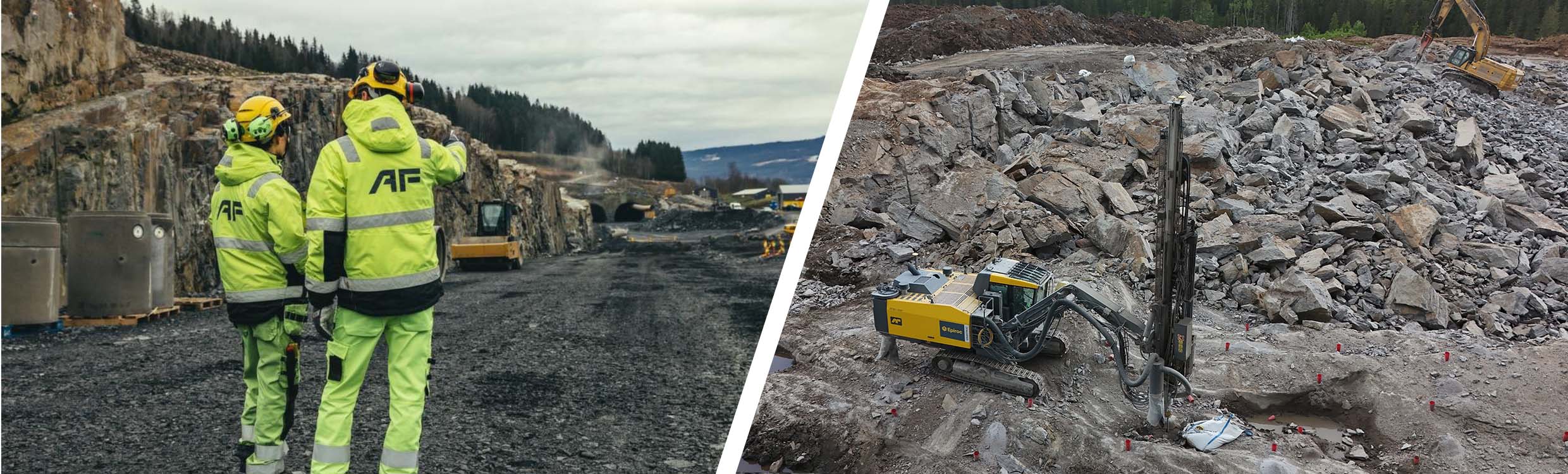
Infrakit × AF Gruppen
How AF Gruppen Gained Control and Clarity on Complex Projects
Explore case →
Dec 19, 2022⏱ 6 min read
Infrakit × DESTIA
“I don't know how this project could have been carried out without Infrakit....”
Explore case →
“
Infrakit makes it easy to monitor progress on the site in real time.
Krista Uutela Design Coordinator at Destia
2. Complex BIM projects needing model coordination
Your main challenge: Getting multiple design stakeholders to access and comment on BIM models without CAD software.
Best fit: BIM-centric platform like Dalux
Why: When your coordination happens around BIM objects, like clash detection, MEP (mechanical, electrical, plumbing) coordination, a BIM viewer keeps everyone working from the same model. Issues are logged directly on objects.
Example: A hospital project with 12 design disciplines coordinating MEP clashes and tracking resolution status.
2. Defect tracking and inspection documentation
Your main challenge: Capturing and tracking site observations with evidence for audits.
Best fit: Plan-based documentation tools like PlanRadar or Capmo
Why: Optimized for pinning photos and notes to plans, with workflows designed around defect lifecycles: reported → assigned → fixed → verified.
Example: A renovation project where every defect needs a photo, responsible party, and timeline—all traceable to the exact plan location.
3. Enterprise-wide standardization including financials
Your main challenge: Connecting field execution to cost control and procurement without data silos.
Best fit: Enterprise suite like Procore
Why: Links field workflows to financial systems, enabling consolidated reporting across 20+ projects.
Example: Large contractors needing unified financial visibility and standardized processes across all projects.
4. RFI and submittal bottlenecks
Your main challenge: Slow response times on formal processes for gathering information from potential suppliers (RFIs) and lost submittals.
Best fit: Structured workflow tools like Autodesk Build
Why: Enforces process discipline around RFIs, submittals, and approvals—making it harder for things to fall through the cracks.
Example: Commercial build where delays come from slow RFI turnaround and unclear approval chains.
5. Simple plan access for site teams
Your main challenge: Foremen working off outdated PDFs.
Best fit: Drawing-first field tools like PlanGrid
Why: Syncs latest plans to mobile devices and lets teams log issues directly on drawings.
Example: Small-to-mid contractor who needs everyone on current plans with simple issue flagging.
If you’re running infrastructure projects and want to see what map-first execution looks like in practice, request a custom Infrakit demo. We’ll walk you through what it looks like to coordinate designs, field documentation, and progress visibility in one shared view.
Request a DemoFinal thought
The “best construction management software” is the one that matches your project reality—especially your execution phase, your stakeholder complexity, and your data flows between design, field, survey, and machines.
If your work is infrastructure-heavy and success depends on real-time location-based coordination, a map-first platform built for the actual construction work execution can create the biggest impact by bringing teams and data into one live view.
If your projects are BIM-driven and model coordination is your bottleneck, a BIM-centric platform may be the right center of gravity—with complementary tools for field execution where needed.
Frequently Asked Questions (FAQs)
Is one platform enough for everything?
Sometimes, but often not. Many high-performing teams pair a BIM-centric tool (design/model collaboration) with a map-based execution platform (field truth), plus ERP/finance systems for commercial control.
What’s the biggest mistake buyers make?
Buying a “big suite” without clear workflows and rollout ownership—then under-adopting it in the field.
What matters most for reducing rework?
One shared source of truth, real-time field documentation, and eliminating version mismatches between office, survey, and machines.
How do I know if I need map-based or BIM-centric software?
Ask yourself: “Where do most delays happen?” If your team struggles with “what’s happening where” across large sites, choose map-based. If your bottleneck is coordinating building models and design conflicts, choose BIM-centric.
Can construction management software integrate with my existing tools and designs?
It depends on the platform’s focus. Map-based execution platforms like Infrakit allow you to import your design models and sync them directly with survey equipment, machine control systems, and drone workflows to create a single source of truth. In contrast, BIM-centric tools focus on integrating with CAD/BIM software for model coordination. To ensure a smooth workflow, always check for specific file format and hardware compatibility before buying.
What if my team won't use new software?
Pick software that makes daily work easier, not harder. Teams adopt tools that save them time—like having the latest plans on their phone instead of hunting through folders. Avoid tools that add extra steps without clear benefits.